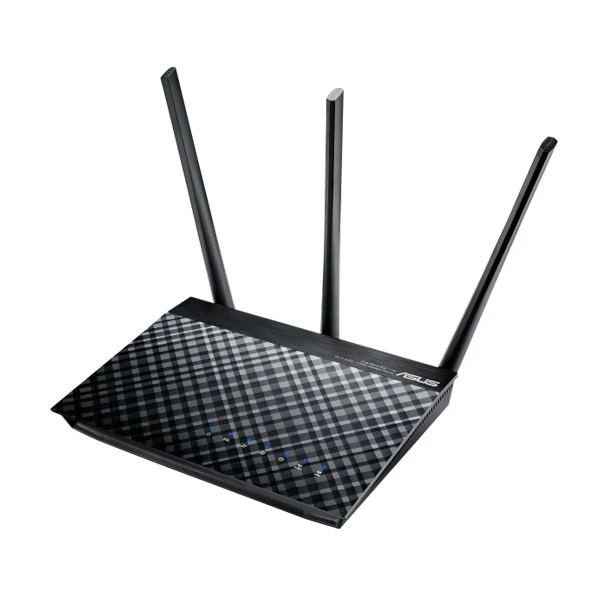
ASUS DSL-AC51 AC750 Dual-Band ADSL/VDSL Wi-Fi Modem Router
The ASUS DSL-AC51 is a ADSL/VDSL 802.11 ac Wi-Fi modem router, with combined dual-band data rates of up to 733Mbps. On the 5GHz band, 802.11 ac gives 433Mbps wireless data rates, while 2.4 GHz 802.11 n performance supports 300Mbps. Compatible with ADSL2/2+, ADSL, Cable, vdsl2 and fiber services, the top specification completes future-proofing.
ASUS DSL-AC51 Feature:
2-in-1 design
Dual WAN ports for dual usage– Wi-Fi router and DSL modem
Great compatibility
Compatible with ADSL2/2+, ADSL, Fiber, vdsl2 and cable services
Intuitive ASUS Router app
Control your network anywhere, without needing to boot up a PC
Parental Controls
Monitor and filter internet activities for your families and children
VPN server and client support
Remotely access your home network through private and encrypted connection
ASUS DSL-AC51 Spec:
| Model Name | ASUS DSL-AC750 |
| Network Standard | IEEE 802.11a IEEE 802.11b IEEE 802.11g WiFi 4 (802.11n) WiFi 5 (802.11ac) IEEE 802.11e IEEE 802.11i IPv4 IPv6 |
| Product Segment | AC750 complete AC performance : 300+433 Mbps |
| Wi-Fi Data Rate | 802.11a : up to 54 Mbps 802.11b : up to 11 Mbps 802.11g : up to 54 Mbps WiFi 4 (802.11n) : up to 300 Mbps WiFi 5 (802.11ac) : up to 433 Mbps |
| xDSL Data Rate | VDSL2 Upstream: 150Mbps, Downstream: 200Mbps ADSL2+ Upstream: 3.3Mbps, Downstream: 24Mbps ADSL2 Upstream: 3.5Mbps, Downstream: 12Mbps |
| Antenna | External antenna x 3 |
| Operating Frequency | 2.4GHz / 5GHz |
| Ports | 1 x RJ11 for xDSL 2 x RJ45 for WAN/LAN |
ASUS DSL-AC51 Advantage:
Future-proofed versatility with 802.11 ac wireless speeds
ASUS AiRadar improves and enhances the wi-fi stability coverage dramatically. The easy-to-use ASUSWRT graphical user interface unlocks the power of ASUS DSL-AC51 giving robust control to optimize your network for you. 30-second setup and easy traffic management means even network newbies can enjoy its sophisticated features, while power users will love its IPv6 support, multiple wireless SSIDs and encrypted VPN access.
One device, two functions
With a choice of DSL or Ethernet WAN connections, ASUS DSL-AC51 can be used a DSL modem plus wireless router, or as a standalone wireless router. You can choose the mode to suit your needs, saving energy and clutter by replacing two separate power-hungry devices. Whether for a basic home setup or an advanced wireless network, ASUS DSL-AC51 has all the flexibility you need. You can also let two modes work simultaneously and handle them with ASUSWRT dual WAN function
ASUS DSL-AC51 supports all common types of DSL connection, including ADSL2, ADSL2+, ADSL and VDSL2. Thanks to its Ethernet WAN option, it can also be used seamlessly with any fiber or cable-based modem with an Ethernet connection. This makes it perfect for those who intend to upgrade their ISP in the future.
Enhanced signal range and stability
ASUS AiRadar intelligently improves wireless connections by using exclusive ASUS RF fine-tuning. This ensures extended coverage, increases dynamic data speed, and enhances stability.
ASUS Router App
Control your network anywhere
In your increasingly mobile-enabled life, having control over your network via an app is more important than ever. The new ASUS Router App is built from the ground-up to be both intuitive and robust, allowing you to setup your router, manage network traffic, diagnose connection issues and even update firmware, all without needing to boot up a PC.
Dedicated Wi-Fi for your visitors
Share your internet connection with your guests without need to share your personal password or network resources. ASUS Guest Network supports as high as six separate guest networks, each with its own usage limits and password. Guests can not access your primary network or any other connected devices.
VPN server and client for encrypted remote connection
With the virtual private network (VPN) server and VPN client, you can access your home network remotely or surf the internet with encryption, no need for paid VPN services or a dedicated VPN server.
Robust control and optimization with ASUSWRT
With the ASUSWRT dashboard UI, monitor, setup, and control network applications all in one intuitive area. With 30-second setup, multi-device detection, and flexible settings, ASUSWRT makes the most of your network performance. Dual WAN enables having two connections/ISPs on one router, with load balance and failover mode for added stability and redundancy to guarantee uninterrupted internet access.